
Summarize with AI





Prepare a rental work log for your CPA by reviewing the facts before you export or share anything. Correct obvious errors, separate unresolved questions from completed records, and make the property and tax year easy to identify.
Your CPA should not have to discover that two properties were mixed together or that “maintenance” means four different jobs. They also should not receive polished guesses where the underlying facts are uncertain.
Confirm the scope first
Start with the cover information for the set you plan to share:
- property identity and address;
- rental strategy and relevant property context;
- tax year;
- report owner;
- people represented in the records; and
- the period covered by the handoff.
If you manage more than one property, prepare a separate view or file for each property and tax year unless your CPA requests another arrangement. Clear scope prevents a later total from being mistaken for a single activity or building.
HostHours treats the property and tax year as part of the workspace rather than as a filter added at export time. The article on keeping properties and tax years separate explains why that boundary matters throughout the year.
Review records before totals
A clean total built from weak entries is still weak. Read the underlying records before focusing on hours by month, person, or category.
Check for:
- a date within the correct tax year;
- the person who performed the recorded work;
- an actual duration rather than a placeholder;
- a category that matches the activity; and
- a factual note that names the work and outcome.
Look for duplicates at the same time. A task may have been entered once from memory and again while processing a receipt. Repeated work can also look like a duplicate even when it occurred on two dates, so compare the property, date, person, duration, and note before removing anything.
Do not rewrite every note into formal accounting language. Plain descriptions such as “replaced the bathroom fill valve and tested for leaks” are easier to assess than broad phrases padded with legal terminology.
Separate owner and non-owner work
Your log should preserve who did each activity. Owner, spouse, cleaner, vendor, co-host, property manager, and contractor are not interchangeable labels.
If an owner called an electrician and the electrician later completed the repair, those activities have different people and durations. Combining both into one entry makes it harder for a professional to understand what the owner did.
Ask your CPA how contributor information should be applied to your situation. Rules can treat a spouse’s work or another person’s participation differently depending on the question being considered. The record’s job is to preserve the person, not to reach that conclusion.
Resolve open months and visible warnings
Work month by month. An open month may contain a missing note, unavailable attachment, unresolved correction, or simply records that have not received a final review.
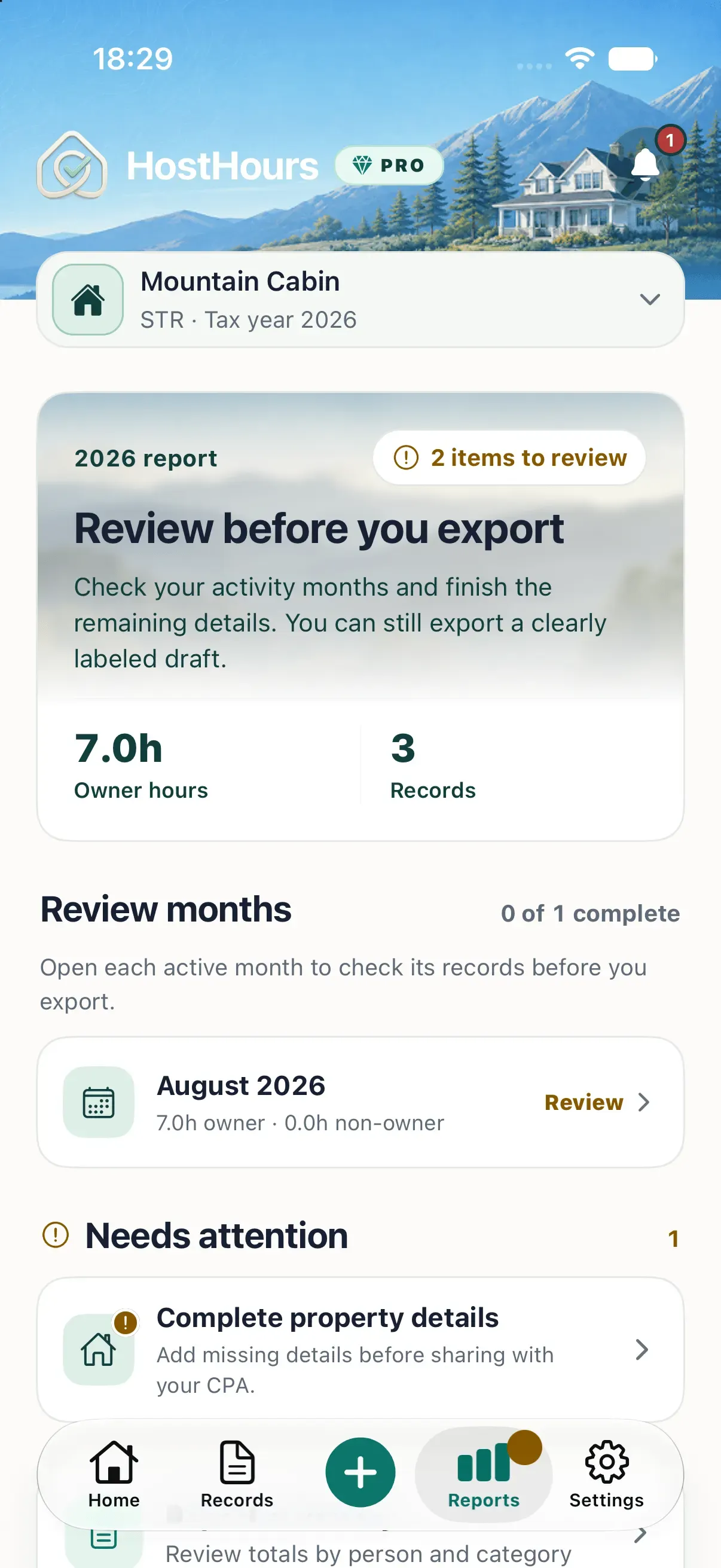
Correct items that have a reliable answer. If an entry depends on a vendor response or a missing source, place it on a question list. Do not delay the entire handoff without telling your CPA why, and do not silently fill the gap.
In HostHours, a finalized month is protected from ordinary edits. It can be explicitly reopened when a correction is needed. That lifecycle helps distinguish a reviewed period from an untouched one without pretending that a finalized month has received professional approval.
The month closeout guide provides a practical sequence for this review.
Attach context with a purpose
Receipts, photos, invoices, PDFs, and references can help explain specific records. Include or link them when they answer a likely question about the activity.
Keep the work note meaningful without the file. A row that only says “see attachment” forces the CPA to open every item before understanding the log. A better note states the work and identifies what the attachment adds.
Preserve source documents outside the log as well. Your CPA may want original statements, invoices, or other records in a different format from the work-log handoff.
Send questions beside the records
Create a short question list for issues that require professional judgment. Good questions point to a specific fact:
- How should travel that combined property work and a personal visit be treated?
- Which contributor hours matter for the test you are evaluating?
- Does this property use need additional day-count information?
- What source documents do you want for this repair?
Avoid asking the spreadsheet or app to answer those questions. A work log can show dates, people, activities, durations, and context. It cannot determine tax status, material participation, deduction eligibility, or the treatment of a specific activity.
Check the shared file as the recipient
Open the exported or shared material before sending it. Confirm that pages are readable, columns are not cut off, attachments open, and the file contains the intended property and year. Use a stable filename that identifies the property, period, and version without exposing unnecessary personal data.
Then send one concise message describing the scope and the unresolved questions. Keep a copy of what you shared and the date you shared it.
The next step is simple: choose one property and review its latest month before looking at annual totals. That is usually where the first useful corrections appear.
Note: This article provides general educational information. It does not determine tax status, material participation, deduction eligibility, or the treatment of a specific activity. Review your facts with a qualified tax professional.
Clear answers
Frequently asked questions
What should I include when I share a rental work log with my CPA?
Include the property and tax year, activity dates, people, durations, categories, factual notes, useful supporting references, and a clear list of questions or unresolved items.
Should I remove incomplete entries before sending the log?
Do not hide a missing or uncertain fact by deleting the record. Correct what you can verify, identify what remains unresolved, and ask your CPA how that item should be handled.
Does an organized work log determine my tax status?
No. The log supplies factual information for review. Your CPA must apply the relevant rules to your full circumstances and decide which facts are relevant.
Should I send every receipt and photo with the first handoff?
Usually not. Keep source files organized and attach the items that explain particular records. Ask your CPA which additional documents they want for their review.