
Summarize with AI





Attach a receipt, photo, or PDF when it answers a question that the work note cannot answer well on its own. The best attachment has a clear job: identify the item purchased, show a condition, preserve a vendor document, or connect a reference to the activity.
An attachment should not be treated as a requirement for every entry. Routine guest messages and short administrative tasks may be understandable from the record alone. A plumbing repair or appliance replacement may benefit from a receipt, an after-photo, and the service invoice.
Begin with the question the file answers
Before adding a file, finish this sentence: “This attachment helps a later reader confirm…”
A useful answer might be:
- which replacement part was purchased;
- what the damaged area looked like before the repair;
- what the vendor reported or billed;
- where a longer source document is stored; or
- which message led to the follow-up activity.
If you cannot name the question, the file may only add clutter. More files do not automatically make a record easier to review.
The work note remains the center of the record. It should state what you did, the result, and any unfinished follow-up. The guide to writing a rental work note covers that part in detail.
Use a receipt for the transaction it records
A receipt is useful when the purchase is part of the activity’s context. It may show the merchant, date, items, and amount. Those facts can help distinguish one supply run or repair from another.
Example: Purchased a replacement fill valve and supply line, then installed both in the downstairs bathroom. Tested the tank through three flushes with no leak observed. Hardware receipt attached.
The receipt supports the purchase in that example. It does not show who installed the parts or how long installation took. Those facts still come from the confirmed activity record.
If one receipt covers several properties or jobs, avoid attaching it without explanation. Add a brief note or split the relevant reference so the later reviewer can see why the file belongs with this activity.
Use photos to preserve a visible condition
Photos work well for conditions that are hard to describe precisely. Examples include water damage before cleanup, a loose railing before repair, the serial plate on an appliance, and the completed result after work.
One or two purposeful images are usually easier to review than a series of nearly identical shots. Capture enough surrounding detail to identify the location, especially when several units have similar fixtures.
A timestamp or camera metadata may help place a photo in context, but the image still has limits. It may show the condition of a sink after repair without showing who completed the work or how much time the work required.
Do not include people, documents, access codes, guest belongings, or private messages unless they are necessary and you have a sound reason to keep them. Crop or exclude unrelated personal information before the image enters a long-lived record.
Use a PDF for a document that should stay intact
PDFs suit vendor invoices, inspection reports, service summaries, and longer documents whose pages belong together. They preserve page order and are often easier to hand off than a collection of screenshots.
Name the connection in the work note or reference field. “Invoice attached” is weaker than “Invoice from the electrician’s August 12 service visit attached.” The second description tells the reviewer which event the document supports.
Store important originals separately. A work-log attachment keeps context close to the activity, but it should not become the only copy of an invoice, warranty, permit, or other source file you may need later.
References can be enough
Sometimes the better choice is a reference rather than a binary file. A vendor invoice number, message thread date, cloud folder location, or calendar event title may let you find the source without duplicating it.
Use references that will still make sense months later. “See email” is too broad. “Plumber email thread, August 12, subject: downstairs supply line” is findable without copying the message into the work note.
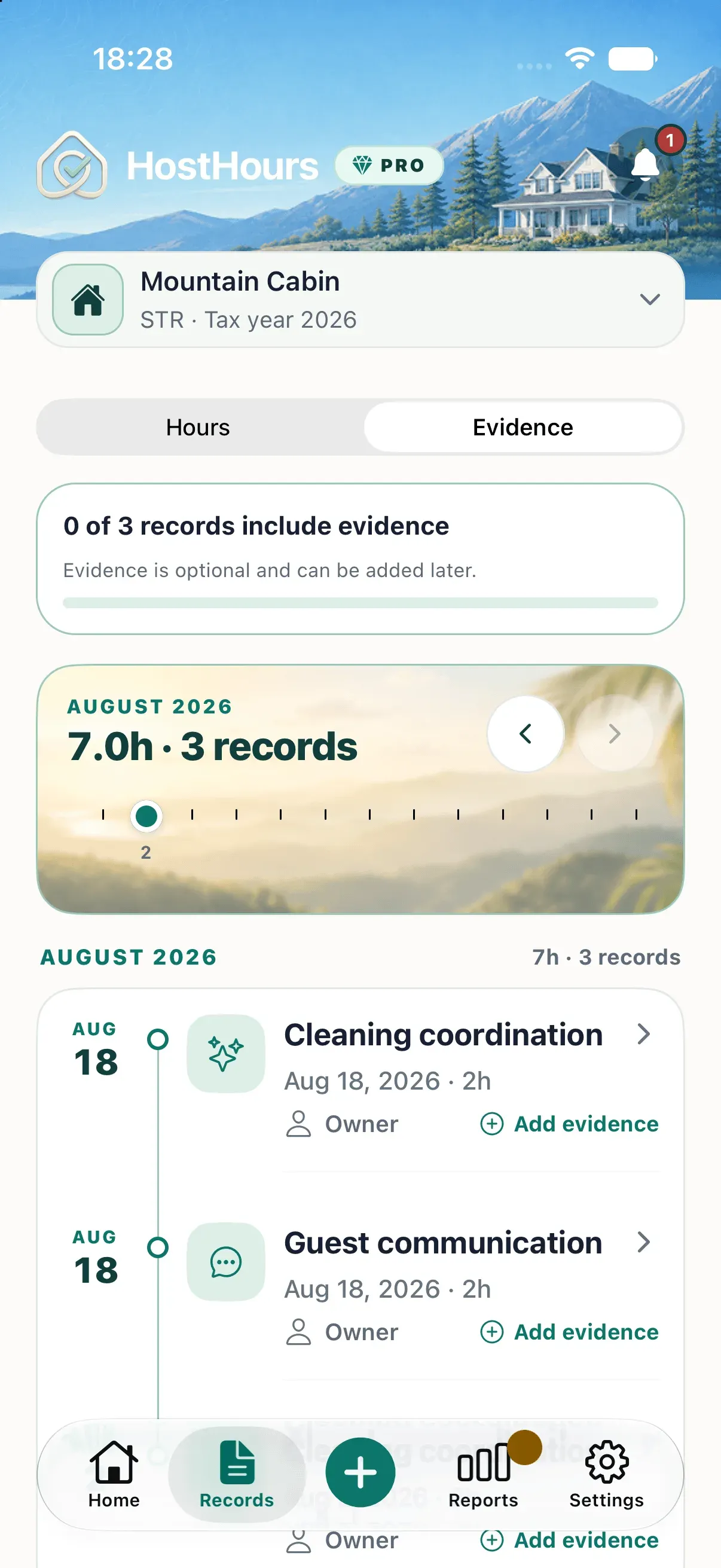
HostHours supports optional evidence alongside an activity. The Evidence view separates records with supporting context from those without it, and its coverage percentage simply identifies records for review.
Check the attachment before you keep it
Open the file after attaching it. Confirm that it is readable, belongs to the correct property and activity, and does not expose unrelated information. Then read the note without the attachment.
The note should still identify the work. Files can disappear, links can expire, and a reviewer may scan a report before opening each item. A record that only says “see photo” leaves too much meaning inside the attachment.
HostHours intentionally does not copy evidence when you repeat a recent activity. A previous receipt or repair photo belongs to the old occurrence. Add new context to the new record only when it relates to that work.
Add context selectively
For your next record, attach no file by default. Ask what question a later reviewer might have, then choose the smallest source that answers it. A receipt, one clear photo, a PDF, or a precise reference may be enough.
This keeps the log readable and makes each attachment explain its place. For the larger workflow, see How to Build a Rental Property Work Log You’ll Actually Keep.
Note: This article provides general educational information about recordkeeping. It is not tax, legal, or accounting advice.
Clear answers
Frequently asked questions
Do I need to attach evidence to every rental work record?
No. Supporting files are optional. Attach one when it answers a useful question about the activity, such as what was purchased, what condition was found, or which service was performed.
Can a receipt confirm how long rental work took?
A receipt can confirm a transaction date, store, and purchased items. It usually cannot establish who performed the related work or how long that work took.
Should I keep the original file after attaching a copy?
Yes. Keep important original receipts, invoices, photos, and documents in the storage system you use for source records. An app attachment should not be your only copy.
Does an attachment prove that an activity receives a tax deduction?
No. An attachment can add context to a factual record, but it does not decide whether the work, purchase, travel, or other activity qualifies for a particular tax treatment.