
Summarize with AI





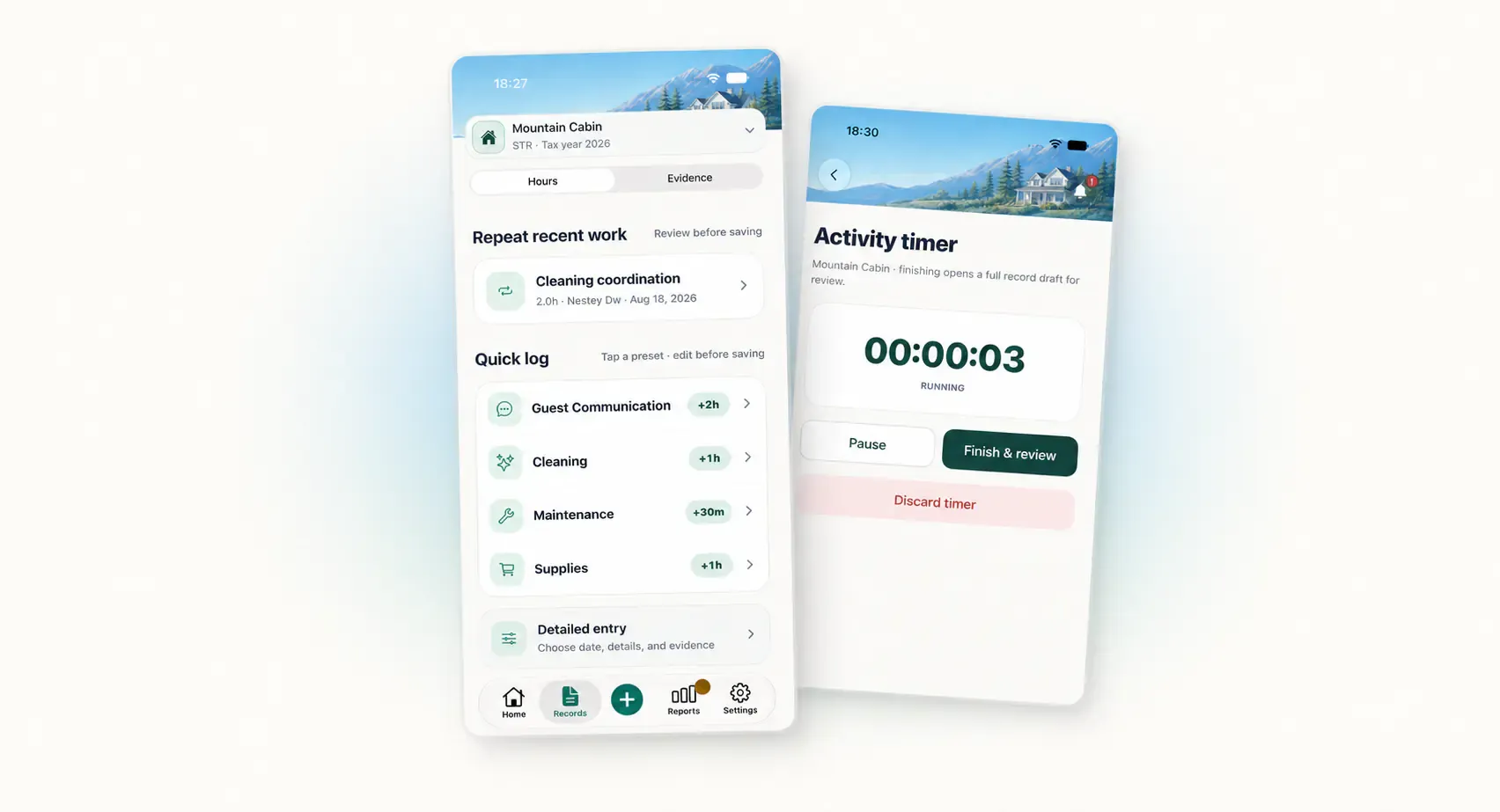
Choose a capture method based on what you know about the work right now. A quick log fits a familiar task. A detailed entry handles unusual facts. Repeat saves retyping when the work is similar. A timer helps when the duration is not yet known.
All four methods should end at the same place: a reviewed activity with the correct property, date, person, category, duration, and factual note. Speed at the beginning should not remove confirmation at the end.
Use Quick log for a simple task you recognize
Quick log works when the category and usual duration give you a useful starting point. In HostHours, the built-in presets cover Guest Communication, Cleaning, Maintenance, and Supplies. Selecting one opens a Review before saving step rather than creating a record immediately.
Use it for work such as:
- a short guest communication block;
- a routine supply run;
- a familiar maintenance check; or
- a cleaning task with a known person and clear outcome.
The preset duration is editable. Increase or decrease it in 15-minute steps so the saved value reflects the work, not the button you happened to choose.
Quick log is a poor fit when the task crosses categories, happened on an earlier date, involves an unusual contributor, or needs a note that cannot be written accurately in a few seconds. Move to Detailed entry instead of forcing the task into a convenient preset.
Use Detailed entry when the facts need room
Detailed entry gives each decision its own place. You choose a date inside the property’s tax year, set the duration, identify the person, select a category, write the factual note, and review the full activity.
It is the better method for:
- a repair with several steps and a follow-up;
- work performed by a cleaner, vendor, spouse, or contractor;
- an older activity whose date needs careful confirmation;
- travel or inspection work that needs precise context; and
- a record with a photo, PDF, or reference attached.
Detail does not mean length. A complete entry may still have a two-sentence note. The difference is that you made each field deliberately.
For help with the note itself, see How to Write a Rental Work Note Someone Else Can Understand.
Use Repeat for the same kind of work, not the same record
Repeat is useful when a recent activity provides a sound starting point. A weekly supply run, recurring cleaner coordination, or a repeated property check may share a category, person, and note structure.
Treat the copied values as a draft. Confirm the new date and duration. Change the result and follow-up to match this occurrence. A previous note saying “no leak observed” does not belong on the new record until you performed the new check.
Evidence should not carry forward. The old receipt, photo, or invoice describes the previous activity. HostHours intentionally leaves it behind when work is repeated.
Repeat is also the wrong choice when two similar tasks happened at different properties. Start from the correct property context and verify every copied field before saving.
Use Timer when duration is the unknown fact
The timer fits work whose length you cannot predict well. Start it when the task begins, pause it when the work stops, resume if needed, then choose Finish & review.
Examples include on-site repairs, a property inspection, or a block of administrative work with a defined beginning and end. A running timer can survive leaving the timer screen, and the Home screen can return you to its current state.
The timer does not decide what the work was. After you finish, complete the same factual fields used by a manual entry. This review prevents a measured duration from becoming an incomplete record.
Pause when you switch to unrelated personal activity. If you move to a different property or task, finish the first timer and begin another activity rather than blending the time.
HostHours limits one saved activity to no more than 23 hours. If an unusually long timer needs to be saved, the timer flow can split it into valid records for review. That safeguard should not replace stopping a forgotten timer as soon as you notice it.
A simple decision rule
Ask one question before you start: which fact is hardest to capture accurately?
- If none of the fields is unusual, use Quick log.
- If several facts require choices, use Detailed entry.
- If a recent record is a valid starting point, use Repeat.
- If duration is unknown, use Timer.
The methods can also work in sequence across a day. You might time an on-site repair, use Quick log for a later guest message, and repeat a routine supply task. They do not need to compete for every activity.
Review every path before saving
Read the final screen as if the entry came from someone else. Does it name the right property and person? Is the date inside the correct year? Does the duration reflect this occurrence? Does the note say what happened?
Optional supporting context can be added now or later. A missing attachment should not block a useful activity, and an attachment should not compensate for a vague note.
The larger rental property work log guide shows how capture, weekly correction, monthly review, and handoff fit together. For your next task, choose the lightest method that preserves the facts, then give the review screen your full attention.
Note: This article provides general educational information about recordkeeping. It is not tax, legal, or accounting advice.
Clear answers
Frequently asked questions
When should I use a quick log for rental work?
Use a quick log for a simple, familiar task when the preset category is accurate and you can confirm the duration and details before saving.
When is a detailed rental work entry the better choice?
Choose a detailed entry when the job has an unusual category, a different contributor, an older date, a specific outcome, or supporting context that needs careful review.
Does repeating a recent activity copy its attachments?
No. A repeated activity should begin as an editable draft and should not inherit old receipts, photos, or files that belong to the previous occurrence.
Does finishing a timer automatically save a work record?
No. Finishing the timer should open a review step. Confirm the property, person, category, duration, factual note, and optional evidence before saving.